Efficient Attendance and Payroll System: How to Choose and Implement Cloud Solutions
Compare the pros and cons of traditional vs. cloud attendance and payroll systems, provide selection criteria and implementation steps to help your business digital transformation.
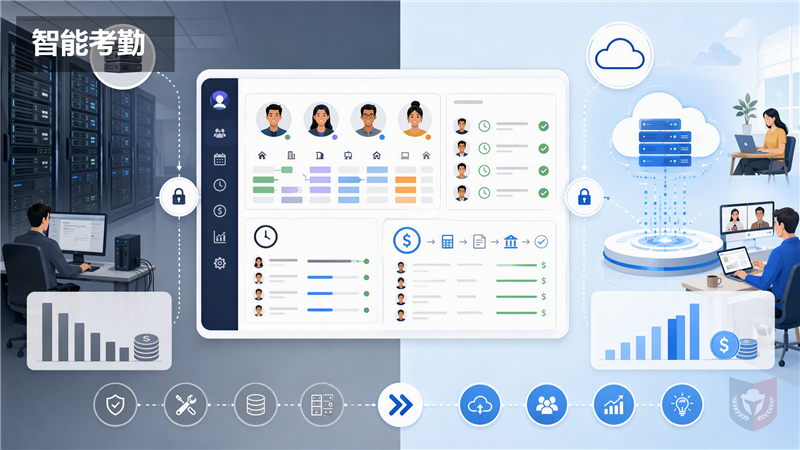
Time & Payroll Suite
Attendance, Payroll and Access Control Solution for Cost Reduction and Productivity Gains Details
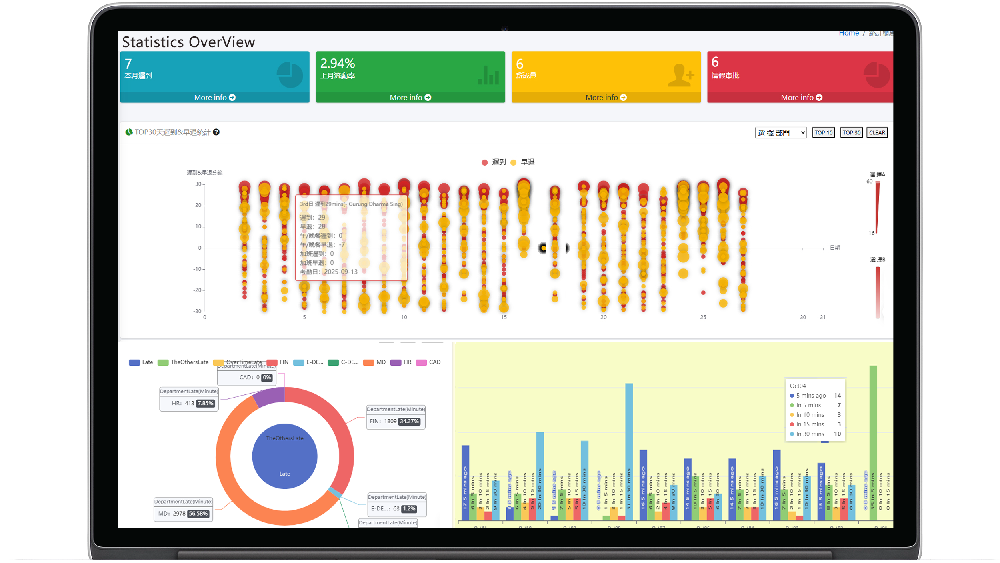
All‑in‑one automated timekeeping and payroll system with robust, secure processes to guarantee payroll integrity. Includes leave management, shift rostering, multi‑site and chain support, multi‑ledger accounting, and comprehensive modules.
Introduction
In today's rapidly changing business environment, the demands on human resource management are increasing. The attendance and payroll system, as a core module of HR management, directly impacts employee satisfaction and operational efficiency. Traditional on-premises systems, while stable, often suffer from high maintenance costs, data silos, and limited remote access. With the maturity of cloud technology, more and more enterprises are considering migrating their attendance and payroll systems to the cloud. This article will provide an in-depth comparison of traditional and cloud-based attendance and payroll systems, offer selection criteria, and share implementation steps and considerations to help HR managers, IT administrators, and SME owners make informed decisions.
Comparison of Traditional and Cloud Attendance and Payroll Systems
Traditional On-Premises Systems
Traditional attendance and payroll systems are typically deployed on the company's internal servers and maintained by the IT department. The advantages of such systems include full control over data, relatively controllable security, and the ability to deeply customize according to business needs. However, their drawbacks are also obvious:
- High initial investment: Requires purchasing servers, database licenses, etc., leading to high hardware and software costs.
- Difficult maintenance: Requires professional IT personnel for daily maintenance, upgrades, and troubleshooting.
- Data silos: Integration with other systems (e.g., ERP, financial systems) is difficult, and data cannot be shared in real-time.
- Limited remote access: Employees cannot view their attendance and payroll information anytime, anywhere, which is increasingly important in the era of remote work.
Cloud-Based Attendance and Payroll Systems
Cloud-based attendance and payroll systems (also known as SaaS) are internet-based services where enterprises do not need to purchase hardware, but rather subscribe on-demand. Their advantages include:
- Low entry cost: No hardware investment, pay monthly or annually, reducing cash flow pressure.
- High flexibility: Can adjust user count and functional modules at any time based on business scale changes.
- Real-time data access: Employees and managers can view data anytime, anywhere via mobile or computer, supporting mobile work.
- Automatic updates: The vendor handles upgrades and maintenance, ensuring the enterprise always uses the latest version.
- Strong integration capability: Cloud systems typically provide APIs, making it easy to integrate with other cloud services (e.g., CRM, ERP).
However, cloud systems also have potential drawbacks, such as data security concerns, dependence on network stability, and lower customization. Therefore, enterprises need to weigh the pros and cons when choosing.
Criteria for Choosing a Cloud Attendance and Payroll System
When selecting a system, enterprises should evaluate from the following dimensions:
Functional Completeness
Ensure the system covers attendance management (including various clock-in methods, scheduling, leave approval), payroll calculation (including tax, social insurance, provident fund), and report analysis. It should also support multiple payroll structures (e.g., hourly, piece-rate, performance-based) and complex attendance rules (e.g., overtime, compensatory time).
Security
Data security is paramount. Enterprises should check whether the vendor has ISO 27001 certification, uses encryption (SSL/TLS) for transmission and storage, and has robust backup and disaster recovery mechanisms. Also, clarify data ownership to ensure the enterprise's data is not misused by the vendor.
Integration
Can the system seamlessly integrate with existing HR, financial, and ERP systems? Does it provide open APIs? Good integration reduces duplicate data entry and improves efficiency.
Cost
In addition to subscription fees, consider implementation costs, training costs, and future upgrade costs. Enterprises should choose a cost-effective solution based on their budget. Watch out for hidden costs, such as extra charges for exceeding user limits or storage.
Vendor Reputation and Support
Choose a vendor with a good reputation and after-sales service. Review customer cases and user feedback, and request a trial period to test the system's performance and customer service response.
Implementation Steps for Cloud Attendance and Payroll System
Implementing a cloud system is not a one-time event; it requires careful planning and execution. Here is a typical implementation process:
Step 1: Needs Analysis
Clarify business requirements, including attendance rules, payroll structures, and approval processes. Communicate with HR, finance, and IT departments to gather input and create a requirements document.
Step 2: Vendor Screening and Selection
Based on the requirements, shortlist vendors that meet the criteria, and invite them for demos or trials. During the trial, test the system's stability, usability, and functionality, and inquire about customer service quality.
Step 3: Data Migration
Migrate existing employee data, attendance records, and payroll history to the new system. Cleanse and organize data before migration to ensure accuracy. Collaborate with the vendor to create a detailed migration plan and test it.
Step 4: System Configuration and Customization
Configure system parameters according to requirements, such as attendance rules, payroll formulas, and approval flows. If customization is needed, discuss the development plan with the vendor.
Step 5: Training and Go-Live
Train HR, IT administrators, and employees on system operation to ensure they are familiar with the new system. Before full go-live, run parallel operations to compare data between old and new systems to ensure consistency. Then gradually switch to the new system and continuously monitor performance.
Step 6: Continuous Optimization
After go-live, regularly collect user feedback and communicate improvements with the vendor. As business changes, adjust system settings to ensure the system always meets needs.
Considerations
During implementation, enterprises should also note the following:
- Data Security and Compliance: Ensure the system complies with local laws and regulations (e.g., GDPR, Hong Kong Personal Data (Privacy) Ordinance), especially when handling sensitive employee information.
- Change Management: Employees may resist the new system; communicate and train effectively, emphasizing the convenience and benefits.
- Vendor Lock-in Risk: When signing contracts, pay attention to clauses regarding data export and contract termination to avoid being locked in.
- Network Stability: Cloud systems rely on the internet; ensure stable network connectivity and consider backup plans.
System Comparison Table
The following is a brief comparison between traditional and cloud systems for reference:
| Dimension | Traditional On-Premises | Cloud-Based System |
|----------|------------------------|--------------------|
| Initial Cost | High (hardware + software) | Low (subscription) |
| Maintenance Cost | High (requires IT team) | Low (vendor responsible) |
| Access | Intranet only | Anywhere, anytime |
| Updates | Manual | Automatic |
| Customization | High | Medium |
| Integration | Weak | Strong |
| Data Security | Enterprise's responsibility | Vendor's responsibility (need to audit) |
| Suitable Enterprises | Large enterprises, data-sensitive enterprises | SMEs, fast-growing enterprises |
Conclusion
Cloud-based attendance and payroll systems are an important step in digital transformation. By comprehensively evaluating functionality, security, integration, and cost, choosing the right cloud solution, and following a scientific implementation process, enterprises can effectively improve HR management efficiency, reduce operational costs, and enhance employee satisfaction. In this process, enterprises should maintain an open mindset and actively embrace change to remain competitive in the new era.
































Featured Reviews
No reviews yet. Be the first to leave one.
Write a review
Supports bold and lists; do not paste external scripts or images
0 / 2000
Visible after review